Track recurring expenses and get a reminder before each bill is due.
Set up rent, subscriptions or a salary once. Folko logs each one when it falls due, and sends a Payment Alert at 9:00 on the morning a bill is due. Payment Alerts are free on every plan.
How do I add a recurring transaction?
Open Recurring transactions
Go to Profile, then Recurring transactions, or use the Recurring shortcut on Home. Tap New recurring.
Fill in the details
Choose Expense or Income, then the description, amount, category and cashbook.
Pick the frequency
Weekly, every 2 weeks, monthly, quarterly or yearly. Set the start date and, if it stops, an end date.
Save it
Folko logs each one when it falls due.
When does Folko remind me about a bill?
For a recurring expense, Folko sends a notification at 9:00 on the morning it is due. The alert names the bill and the amount.
The alert is set on your phone, with no server involved, so it arrives without a connection. Folko plans the next two due dates of each rule, and renews the plan whenever you change a rule or open the app.
Income does not get an alert, so a salary never shows up as a payment due. A paused or ended rule gets none either.
You can turn Payment Alerts off under Profile, then Notifications.
What if my bank already pays it?
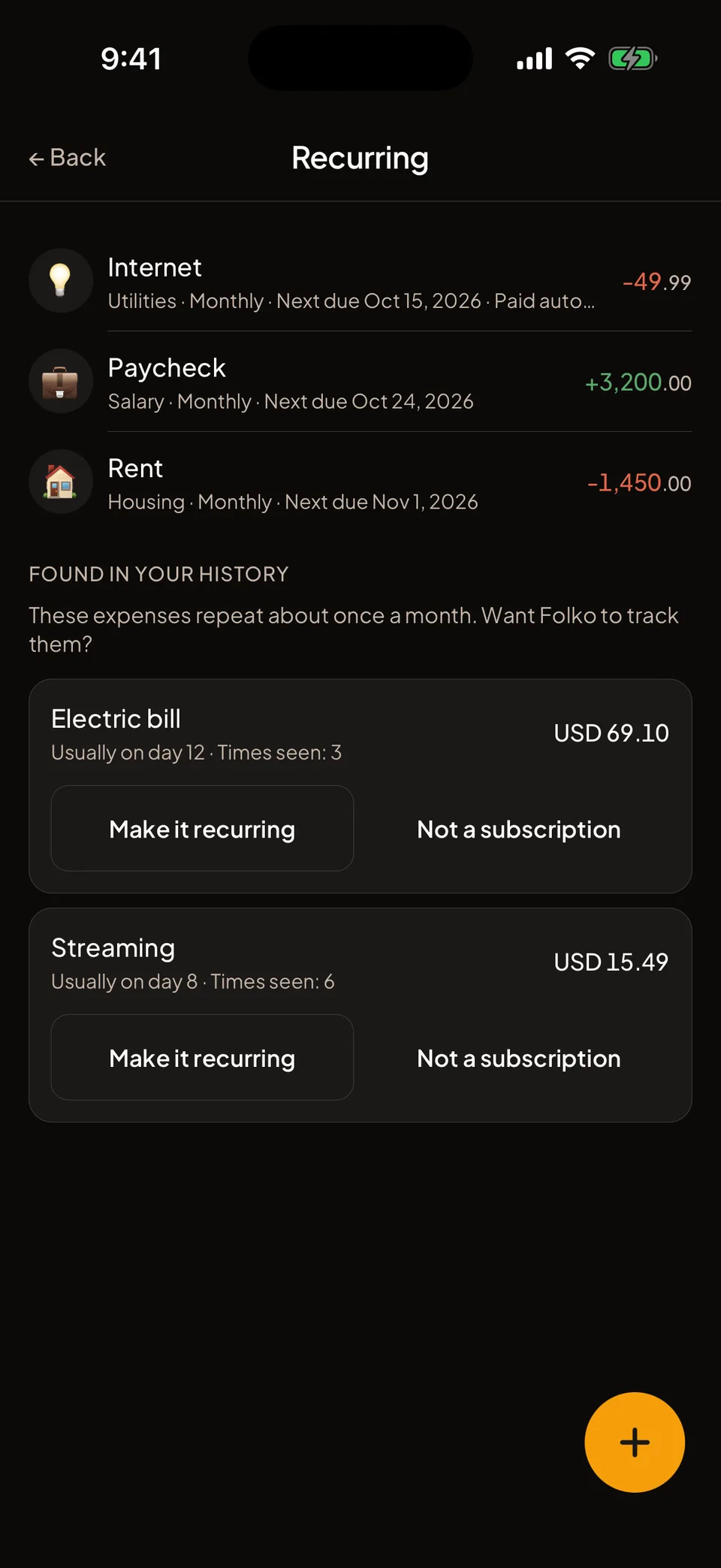
Switch on Paid automatically for a bill your bank or card pays by itself. Folko still logs it, but sends no alert, and Home shows it as Automatic.
That keeps the reminders for the bills you pay by hand.
Can Folko find subscriptions I never set up?
Folko looks through your own recent expenses for charges that repeat about once a month. It needs at least three, with similar amounts and roughly a month between them. It lists what it finds under Found in your history, below your recurring transactions.
It only suggests. Tap Make it recurring and the usual form opens with the name, amount, category, cashbook and day already filled in. Tap Not a subscription to dismiss one.
What if the price changes?
Annual increase % raises the amount once a year, for rent or a subscription that goes up.
Editing a recurring transaction changes future ones only. Skip next skips a single occurrence. Swipe a recurring transaction to stop it, and your past transactions stay.
Home lists what is due next under Upcoming. Free includes 3 recurring transactions. Plus and Max have no limit.
Recurring and Payment Alerts, answered.
Do I need a paid plan for Payment Alerts?
No. Payment Alerts are on every plan. Free includes 3 recurring transactions. Plus and Max have no limit.
Does the reminder need an internet connection?
No. The alert is set on your phone ahead of time, so it arrives without a connection.
How do I stop an alert for a bill my bank pays by itself?
Switch on Paid automatically in that recurring transaction. Folko still logs it, but sends no alert, and Home shows it as Automatic.
Does editing a recurring transaction change what I already logged?
No. An edit changes future transactions only. Past entries stay as they were.
Coming to iOS and Android.
Free forever. Send us a note and we’ll write back the day it’s out.
Notify me at launch